
Last updated on
Oct 31, 2026
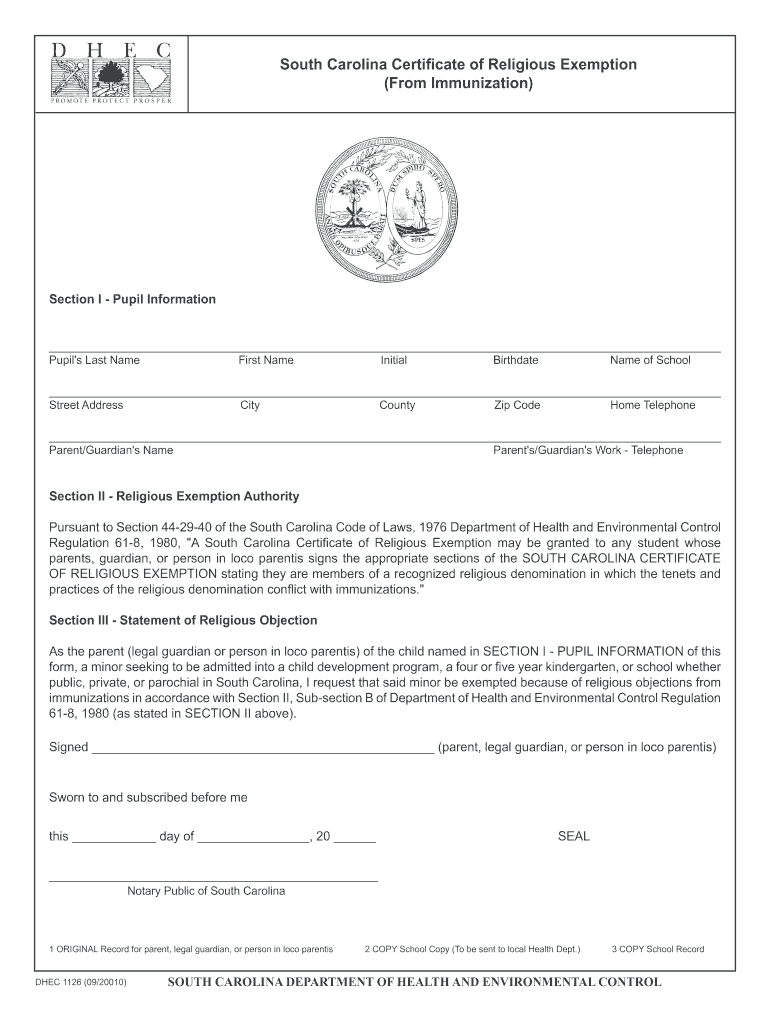
SC DHEC 1126 2010-2026 free printable template
pdfFiller is not affiliated with any government organization

Fill out
Complete the form online in a simple drag-and-drop editor.

eSign
Add your legally binding signature or send the form for signing.

Share
Share the form via a link, letting anyone fill it out from any device.

Export
Download, print, email, or move the form to your cloud storage.
Why pdfFiller is the best tool for your documents and forms


End-to-end document management
From editing and signing to collaboration and tracking, pdfFiller has everything you need to get your documents done quickly and efficiently.
Accessible from anywhere
pdfFiller is fully cloud-based. This means you can edit, sign, and share documents from anywhere using your computer, smartphone, or tablet.
Secure and compliant
pdfFiller lets you securely manage documents following global laws like ESIGN, CCPA, and GDPR. It's also HIPAA and SOC 2 compliant.
What is SC DHEC 1126
The South Carolina Certificate of Religious Exemption is an official document used by parents or guardians to exempt their child from school immunization requirements based on religious beliefs.
pdfFiller scores top ratings on review platforms




It's great have been able to find up to date document layouts here that I haven't found anywhere else. Some sites have the necessary but they are expired, not this one
Everything is easy to understand and access. I couldn't imagine doing business without PDFfiller!
Who needs SC DHEC 1126?
Explore how professionals across industries use pdfFiller.

SC DHEC 1126 is needed by:
-
Parents or guardians seeking immunization exemptions for their children
-
Notaries Public for certification purposes
-
Schools requiring proof of religious exemption
-
Health officials needing documentation of exemptions
-
Legal guardians handling educational decisions
Comprehensive Guide to SC DHEC 1126
What is the South Carolina Certificate of Religious Exemption
The South Carolina Certificate of Religious Exemption is a crucial document for parents in South Carolina who wish to exempt their child from mandatory immunization requirements for school enrollment due to religious objections. This form serves as a formal request, acknowledging the family's religious beliefs while fulfilling state regulations. Understanding the legal framework surrounding the religious exemption certificate in South Carolina is essential for parents to navigate school immunization policies confidently.
By utilizing the south carolina religious exemption form, families can ensure compliance with educational requirements while honoring their personal beliefs.
Purpose and Benefits of the South Carolina Certificate of Religious Exemption
The South Carolina Certificate of Religious Exemption is vital for parents of school-age children, providing a pathway to exempt their children from vaccinations. This form not only addresses immunization requirements but also alleviates potential emotional burdens associated with vaccination mandates.
Families choosing this route may find peace in aligning their children's education with their religious convictions, fostering a supportive community and legal protection. Using the sc immunization exemption form secures both educational eligibility and personal beliefs.
Who Needs the South Carolina Certificate of Religious Exemption
The primary users of the South Carolina Certificate of Religious Exemption include parents and guardians of school-age children. This form is applicable in specific scenarios where vaccination conflicts with religious beliefs.
Understanding who needs this form is essential, as implications include ensuring children remain eligible for school attendance without compromising familial values. Families should evaluate their situation to determine the necessity of the certificate, especially as it pertains to children's education.
How to Fill Out the South Carolina Certificate of Religious Exemption Online (Step-by-Step)
Filling out the South Carolina Certificate of Religious Exemption online can be efficiently accomplished through pdfFiller. Follow these steps to complete the form accurately:
-
Access the form through pdfFiller's platform.
-
Input detailed pupil information, including the child's name and grade.
-
Provide parent or guardian details in the specified fields.
-
Sign the form, ensuring to include the parent's signature.
-
Arrange for notarization, confirming involvement with a certified notary public.
Pay attention to specific fields such as the pupil's information and include notarization, which is essential for the form to be valid.
Common Errors and How to Avoid Them
When completing the South Carolina Certificate of Religious Exemption, users frequently encounter various errors. Common mistakes include inaccurate pupil information, missing signatures, and failing to notarize the form.
To ensure accuracy and compliance, here are some tips:
-
Double-check pupil and parent information before submission.
-
Ensure all required fields are filled appropriately.
-
Verify notarization requirements are fulfilled.
A thorough review of the completed form can prevent unnecessary processing delays.
How to Sign or Notarize the South Carolina Certificate of Religious Exemption
Completing the signing and notarization of the South Carolina Certificate of Religious Exemption is crucial. Parents can opt for different signature methods, including digital or wet signatures.
The notarization process reinforces the document's validity; thus, parents should find a qualified notary public and ensure all required documentation is present. Failing to properly notarize can lead to complications or rejected forms.
Document Submission and Tracking After Completion
Once the South Carolina Certificate of Religious Exemption is filled out, parents must submit the form appropriately. The submission process involves sending the completed document to the relevant school district or authority.
To track the status of the submission:
-
Request confirmation from the receiving authority.
-
Follow up to inquire about processing times.
Be prepared for potential wait times as the forms are processed and confirmed.
Security and Compliance When Using the South Carolina Certificate of Religious Exemption
Handling sensitive information securely is paramount. pdfFiller employs robust security measures, including encryption and compliance with regulations, to protect user data when using the South Carolina Certificate of Religious Exemption.
Choosing secure platforms for document management is crucial to maintaining user privacy and ensuring data protection throughout the process.
Example of a Completed South Carolina Certificate of Religious Exemption
For better understanding, reviewing a sample completed South Carolina Certificate of Religious Exemption can be helpful. This example illustrates key fields and sections that need to be filled out accurately.
Common formats for completion can vary; parents may choose to complete the form either by handwriting or typing their entries. Visual examples can serve as an aid for ensuring correctness in submissions.
Getting Started with pdfFiller for Your South Carolina Certificate of Religious Exemption
Engaging with pdfFiller offers a seamless experience for filling out the South Carolina Certificate of Religious Exemption. This platform simplifies the process of editing, storing, and sharing necessary documents.
Take advantage of pdfFiller’s features to enhance your document management experience, ensuring you fill out the south carolina dhec form 1126 efficiently and securely.
How to fill out the SC DHEC 1126
-
1.To begin, access pdfFiller and search for the South Carolina Certificate of Religious Exemption form. Start a new project and select the form.
-
2.Once the form is open, review the instructions clearly displayed at the top of the document. Familiarize yourself with the required sections.
-
3.Before filling out the form, gather necessary information such as the pupil's full name, date of birth, school information, and the specific religious objection statement.
-
4.Utilize the interactive fields in pdfFiller to enter the pupil information and parent or guardian details. Click on each field to type directly into the form.
-
5.If other parties need to sign, ensure their spaces are clearly marked, and prompt them for their signatures if needed.
-
6.Carefully review each filled section, ensuring that all fields are completed accurately and that the religious objection statement is articulated clearly.
-
7.Once everything is filled out, double-check for any typos or missing information, as this may lead to processing delays.
-
8.After reviewing, save your form directly in pdfFiller. You can download a copy for personal records or submit the form electronically as required.

Who is eligible to use the South Carolina Certificate of Religious Exemption?
The South Carolina Certificate of Religious Exemption is primarily intended for parents or guardians residing in South Carolina who wish to exempt their children from immunization requirements for school due to religious beliefs.
What documents do I need to submit with this form?
When submitting the South Carolina Certificate of Religious Exemption, you typically do not need additional documents unless specified by your school or local health department. Ensure your statement is clear and comprehensive.
How do I submit the Certificate of Religious Exemption?
You can submit the completed South Carolina Certificate of Religious Exemption directly to your child's school. Check with the school for preferred submission methods, which may include physical delivery or electronic submission.
Are there any deadlines for submitting this form?
It is advisable to submit the South Carolina Certificate of Religious Exemption as early as possible before the academic year begins to ensure your child can enroll without immunization requirements.
What common mistakes should I avoid when completing this form?
Common mistakes include leaving required fields empty, failing to sign and notarize the form, and not providing a clear statement of religious objection. Double-check all entries before submitting.
How long does it take to process this form?
Processing times for the South Carolina Certificate of Religious Exemption may vary by institution. Generally, schools will confirm receipt and processing within a few days to a week, depending on their procedures.
Is notarization required for this form?
Yes, notarization is required for the South Carolina Certificate of Religious Exemption. Ensure that both the parent or guardian and the notary public complete their signatures as per the instructions.
Related Forms


Get the latest insights from our blog


If you believe that this page should be taken down, please follow our DMCA take down process
here
.
This form may include fields for payment information. Data entered in these fields is not covered by PCI DSS compliance.